
A Tablet Counter is a machine designed to count solid tablets accurately before packaging or dispensing. It is commonly used in pharmacies, nutraceutical facilities, and regulated manufacturing environments. Instead of relying on manual counting, the equipment moves tablets through controlled channels and detects each passing unit.
The process is practical but not mysterious. Tablets are loaded into a hopper, where vibration or gentle mechanical movement guides them toward counting lanes. Optical sensors, infrared beams, or electronic detectors register each tablet as it passes. The system then stops the flow when the programmed quantity is reached. An operator may set a count of 30, 60, or 100 tablets, depending on the container and production requirements. Some models also connect with bottle handling, capping, and labeling equipment.
Accuracy depends on more than the machine itself. Tablet size, shape, surface texture, dust, and static electricity can influence performance. Chipped or overlapping tablets may create counting errors. That limitation matters. Operators should clean contact areas, verify sensor alignment, and compare machine counts with a trusted manual sample. Many facilities also follow written procedures, calibration schedules, and documented quality checks.
A reliable Tablet Counter saves time and reduces repetitive work, but it does not remove human responsibility. Experienced staff still inspect unusual results and investigate inconsistencies. Manufacturer instructions and site-specific quality systems should guide operation. In practice, the best results come from matching the machine to the tablets, maintaining it carefully, and reviewing its performance regularly. Technology helps. Judgment remains essential.
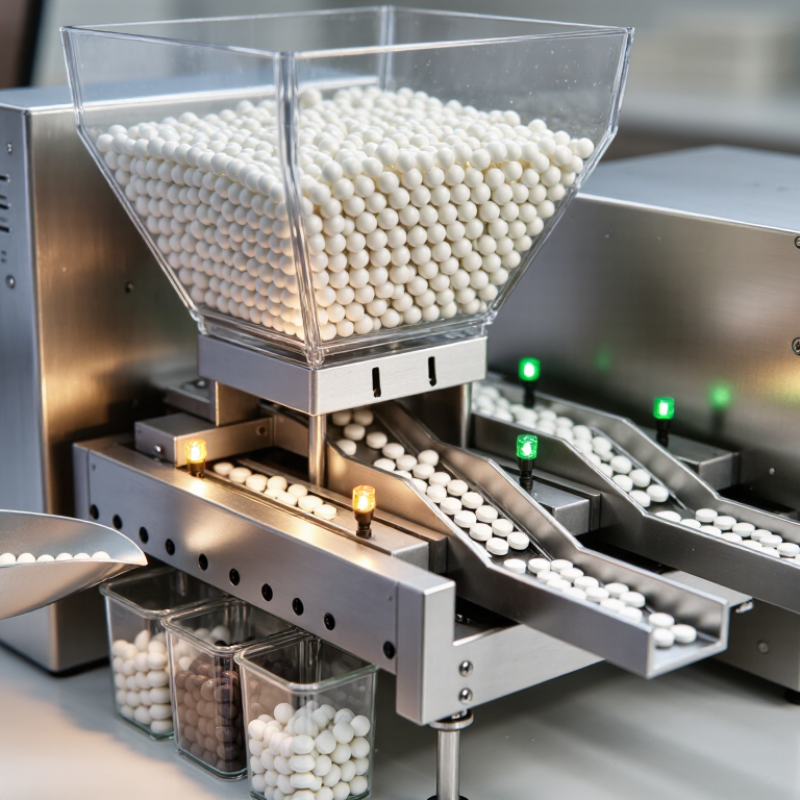
What is a tablet counter? It is a pharmaceutical packaging machine that counts solid tablets before filling bottles, pouches, or other containers. Most models use vibration to separate tablets into a steady flow. Optical sensors then detect each tablet as it passes through counting channels. The system records the total and stops when the programmed quantity is reached. Some units also check bottle position, tablet flow, and rejected items.
The process looks simple, but accuracy depends on tablet shape, dust, speed, and surface finish. Flat tablets may overlap. Highly reflective coatings can confuse optical sensors. Operators usually adjust vibration, channel width, and sensor sensitivity during setup. Practical experience matters here. A clean machine is not always a fast machine.
Grand View Research valued the global pharmaceutical packaging market at about 129 billion U.S. dollars in 2023, showing the scale of automated packaging demand. FDA process-validation guidance also emphasizes documented controls and repeatable performance, not a single successful batch. For that reason, qualified teams verify count accuracy at startup and during production. They compare machine counts with manual samples and investigate any difference. No counter is perfect. Even a well-calibrated unit can miscount when tablets bridge, chip, or carry excessive dust. Reliable operation requires suitable equipment, trained staff, maintenance records, and careful checks.
A tablet counter uses a feeder to separate tablets and an optical sensor to detect each tablet as it passes through the counting channel. The controller increases the cumulative count by one for every detected tablet and stops the feed when the target quantity is reached. The chart shows a 100-tablet filling cycle and the corresponding cumulative count.
A tablet counter is a device that counts solid tablets during production, packaging, or quality checks. It helps operators fill containers with a consistent quantity. In practice, the right counter depends on tablet shape, speed, and required accuracy. A small round tablet may behave very differently from a large, fragile one.
Manual counting trays are the simplest type. An operator spreads tablets across grooved channels and moves a sliding plate. This method suits small batches, training, and occasional checks. It is inexpensive, but results depend heavily on attention and hand movement. Some workplaces use semi-automatic counters instead. These systems feed tablets through a vibrating channel, then pause when the target number is reached. They reduce repetitive work without requiring a large production line.
Electronic optical counters use sensors to detect tablets as they pass an opening. They are useful when fast, repeatable counting matters. Automatic counters can combine feeding, sensor counting, filling, and container handling. Weight-based counters estimate quantity by measuring the total tablet weight. They work best when tablet weights are consistent. They are less suitable when weight varies noticeably.
No counter is perfect.
Dust, chipped edges, static, and overlapping tablets can cause errors. Experienced operators still check sample counts, clean sensor areas, and compare readings with a verified reference. Small details matter.
What Is a Tablet Counter and How Does It Work?
A tablet counter uses controlled movement and electronic sensing to count solid tablets accurately. In a regulated production area, the process usually begins with a clean hopper filled with tablets. A vibrating feeder spreads them into an even flow. This step matters because crowded tablets can overlap and cause inaccurate readings.
The tablets then travel through a guided channel or across a counting surface. Optical sensors detect each tablet as it passes. Every interruption of the light beam creates one electronic count. The control system compares that count with the required quantity. When the target is reached, a gate or conveyor section directs the counted tablets into a container. The system may pause briefly before starting the next container. This reduces mixing between batches.
In real operation, accuracy depends on more than the sensor. Tablet shape, dust, static electricity, and uneven feeding can affect results. A trained operator should inspect the feed path, clean approved contact areas, and verify the count with a documented check. Not every miscount means the machine failed. Sometimes the tablets entered too quickly. Sometimes the setup was incomplete. That distinction needs honest review.
Tips: Keep tablets within the equipment’s specified size range. Use a steady feed rate. Check sensor alignment before production. Record test counts at regular intervals. If results drift, stop and investigate rather than simply increasing the speed. Calibration records and cleaning procedures support reliable performance.
| Step | Process Stage | What Happens | Main Components | Typical Operating Data | Quality or Safety Check |
|---|---|---|---|---|---|
| 1 | Tablet Loading | Bulk tablets are placed into a hopper or infeed container. The product should be dry, intact, and suitable for the counter's feeding system. | Hopper, product chute, vibration tray or belt conveyor | Common batch flow: continuous feeding; tablet sizes often handled range from approximately 3 to 25 mm in diameter, depending on equipment design. | Check for broken tablets, excessive dust, foreign material, and product mix-ups before counting begins. |
| 2 | Tablet Separation | The feeding system spreads tablets into a controlled, single-file or separated flow so that individual tablets can pass the sensing point without overlapping. | Vibratory feeder, rotary disc, slotted belt, guide rails | Key requirement: stable spacing between tablets; excessive overlap can cause undercounting or double-counting. | Adjust vibration, belt speed, or guide width to prevent tablets from touching or stacking. |
| 3 | Detection | Each tablet interrupts or reflects a detection signal as it passes through the counting zone. The machine converts each detected event into an electronic pulse. | Photoelectric sensor, optical receiver, LED light source, or laser-based detector | Detection principle: one valid sensor event is normally assigned to one passing tablet. | Sensor alignment, light shielding, and clean optical surfaces help reduce missed counts and false signals. |
| 4 | Signal Processing | The control system filters the sensor signals, rejects abnormal pulses, and adds valid tablet events to the running count. | Controller, signal processor, encoder, touchscreen interface | Displayed value: running count = previously accepted tablets + newly validated sensor events. | Use an appropriate sensitivity and filtering setting for the tablet's color, shape, transparency, and surface finish. |
| 5 | Target Quantity Comparison | The running count is continuously compared with the programmed target quantity for the container or package. | Recipe settings, counter memory, operator control panel | Example target: 30, 60, 90, or another defined quantity per container; the target must be set before production. | Verify the target quantity against the approved packaging instruction before starting a batch. |
| 6 | Container Filling | When the target count is reached, the outlet directs the counted tablets into a bottle, pouch, tray, or other approved container. | Filling chute, container holder, indexing conveyor, discharge gate | Filling sequence: container positioned → counted tablets discharged → filled container released. | Confirm that the container is correctly positioned and that no tablets remain on the chute or conveyor. |
| 7 | Count Reset and Refill | After a successful discharge, the counter resets the count for the next container while the feeder continues or resumes tablet flow. | Reset logic, proximity sensor, conveyor control, discharge gate | Cycle principle: the counter returns to zero only after the programmed quantity has been discharged or the cycle is otherwise confirmed. | Check that the reset occurs once per container and that tablets are not carried over into the next count. |
| 8 | Reject or Alarm Handling | If a jam, sensor fault, missing container, abnormal flow, or count discrepancy is detected, the system may stop the line or activate an alarm. | Alarm indicator, reject mechanism, emergency stop, fault display | Typical response: stop feeding, identify the fault, clear the cause, and restart only after verification. | Investigate every alarm and document any rejected or manually checked container according to the applicable procedure. |
| 9 | Verification and Recordkeeping | Operators verify the count using an approved inspection method and record production, adjustments, stoppages, and deviations. | Checkweigher or manual count check, batch record, calibration reference | Verification frequency: determined by the site's quality procedure, product risk, and regulatory requirements. | Maintain traceable records and confirm that the machine remains within the approved operating settings. |
Important: Actual throughput, tablet-size limits, counting accuracy, and verification intervals depend on the machine design, tablet characteristics, operating settings, and applicable quality requirements. Always use validated settings and approved operating procedures for production.
A tablet counter combines controlled feeding, detection, and collection in one compact system.
Its hopper holds tablets before a vibration feeder separates them into a steady stream. Guide rails keep each tablet moving in a clear path. Optical sensors then detect and count individual pieces. A programmable control panel displays the count, speed, and alarm status. Many systems also include a conveyor, discharge chute, and stainless-steel contact surfaces for easier cleaning. These components support consistent operation, but performance still depends on tablet shape, dust, and feeding speed.
Useful features include recipe storage, adjustable counting rates, automatic stopping, and container detection. A reject mechanism can remove double feeds or unusual gaps. Some counters provide calibration tools, allowing operators to compare the displayed count with a manual check.
In practical use, transparent tablets or uneven surfaces may challenge optical sensors. No counter is perfect. Regular testing remains necessary. Operators should inspect sensor alignment, clean the hopper, and verify counts at the start of each production run.
Tips:
Keep tablets below the feeder’s maximum load. Overfilling can create pressure and irregular flow. Use a small sample to check accuracy before extended operation. Record any missed counts, especially after changing tablet size.
This simple record can reveal patterns that routine cleaning may not solve. Calibration should follow the equipment manual and be performed by trained personnel. Safety guards should remain closed during operation.
What Is a Tablet Counter and How Does It Work?
Tablet counters are commonly used wherever solid medicines must be counted accurately and efficiently. Retail pharmacies use them during prescription preparation, especially when staff handle many orders daily. A typical unit uses a counting tray, sensors, or controlled vibration to separate tablets. It then records the selected quantity and helps reduce manual counting errors.
Hospitals may use tablet counters in central pharmacies and medication preparation areas. Staff can count doses for inpatient treatments, discharge packs, and scheduled medication rounds. Long-term care pharmacies also rely on them when preparing several patients’ medications at once. Small clinics may use compact counters when space and staffing are limited. The setting changes, but cleanliness, calibration, and clear procedures remain essential.
Tablet counters are also found in contract packaging facilities and regulated manufacturing sites. Workers use them to fill labeled containers before inspection and release. These facilities often document equipment checks, batch details, and cleaning records. From practical observation, speed is useful, but it can create false confidence. Dust, damaged tablets, or mixed sizes may affect sensor readings. An operator still needs to inspect the count, container, and product appearance. The machine assists judgment. It does not replace it.
Accreditations
ISO 9001 Quality Management
HSE Management Compliant
Products and services comply with relevant Australian (AS) and international (ISO, etc.) Standards.
"*" indicates required fields