
Choosing an Auto Phone Holder is about more than keeping a phone within reach. The right mount can keep navigation visible while limiting the need to search across a seat or console. Yet no holder makes distracted driving harmless. The National Highway Traffic Safety Administration reported 3,308 deaths in distraction-affected crashes in 2022. That figure covers many kinds of distraction; it does not show that phone holders caused those deaths. This distinction matters.
Driving-distraction researcher David Strayer has summarized a key human-factors concern: “The brain is not wired to multitask.” A mount can improve phone placement, but drivers still need to manage attention carefully. Small detail. Big difference. This guide compares ten common types, including vent, dashboard, windshield, cup-holder, CD-slot, magnetic, clamp-style, wireless-charging, headrest, and seat-bolt mounts. Their trade-offs are tangible: a vent mount may wobble on a rough road, while a windshield mount can take up valuable glass space. Fit also depends on the vehicle, phone size, case, and preferred viewing angle. There is no universal winner. Some advertised features sound convincing, but real-world stability and easy adjustment matter more. The sections ahead explain how each design attaches, where it works best, and what to check before choosing. Use the comparisons as a practical starting point, not a promise that any mount will suit every dashboard.
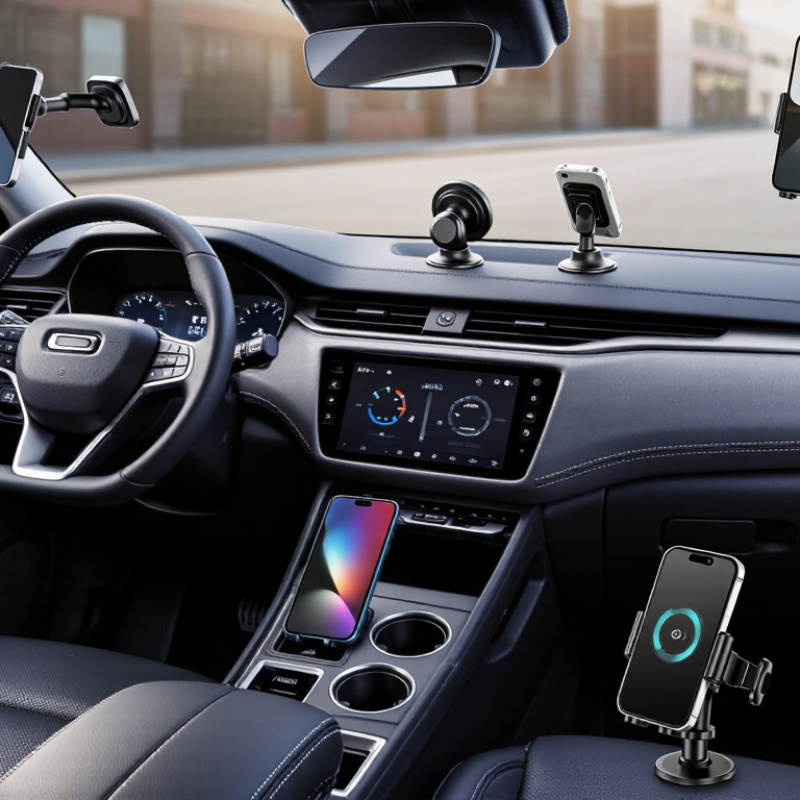
Auto phone holders differ by where they attach, how they grip a phone, and whether they supply power. Seven common mounting-point types are windshield, dashboard, air-vent, cup-holder, CD-slot, headrest, and rearview-mirror mounts. A windshield suction cup gives a clear view, but heat can weaken its hold. Dashboard mounts often use adhesive pads; check that the surface is clean and relatively flat. Vent clips are compact, though heavy phones may tilt some vents downward.
Cup-holder mounts adjust easily, but can crowd nearby controls. CD-slot holders use an otherwise idle opening, while headrest mounts serve rear passengers. Mirror mounts sit high, so check that the phone does not block your view. Small detail, big difference.
Grip styles add two more types: spring-clamp and magnetic holders. A clamp grips the phone’s edges and usually suits varied case shapes. Magnetic designs allow quick placement, but require a compatible phone or attached metal plate. The tenth type is a wireless-charging holder, which combines a mount with power delivery. Charging can slow when the phone is hot or poorly aligned. There is no perfect setup; a holder that feels secure in a parked car may still wobble on a rough road.
Auto phone holders differ not only in shape, but also in where they attach. Dashboard, windshield, and air-vent mounts each suit a different cabin layout. The best position keeps the screen easy to glance at without blocking the road view or important controls. Small details matter.
A dashboard mount usually uses an adhesive base or a weighted pad. It can keep the phone close to the driver, though textured surfaces may weaken some adhesives. Windshield mounts often use a suction cup and offer flexible positioning. Check that the phone does not obstruct your view. Air-vent mounts clip onto a vent, saving dashboard space. However, a heavy phone can make some vents sag, and airflow may heat or cool the device. Each placement has trade-offs; a setup that looks neat while parked may feel awkward once driving.
Tips: Test the position while the car is parked, then adjust the angle before setting off. Make sure the holder grips your phone securely over small bumps. Keep charging cables tidy and away from pedals. If the mount shifts, reconsider the location rather than repeatedly reaching for it on the road.
CD-slot mounts and cup-holder mounts are two practical vehicle-interface options. A CD-slot holder grips the player opening with a padded tab, placing the phone near the dashboard. It usually needs no adhesive. However, slot sizes and shapes vary, and the mount may obstruct the player or feel loose on rough roads. Check the fit before relying on it.
A cup-holder mount uses an adjustable base that expands inside the console’s holder. Its flexible neck can bring the screen closer, though a tall phone may wobble or crowd nearby controls.
The AAA Foundation for Traffic Safety’s 2017 study found that some visual-manual in-car tasks could take about 40 seconds to complete. That makes easy access useful, but a mount cannot remove distraction; set navigation before moving.
Tips: Test the phone’s grip, check that vents and controls stay clear, and adjust the viewing angle while parked. CD-slot mounts can be a neat fit, but compatibility is easy to overlook.
What Are the Top 10 Types of Auto Phone Holders?
Adhesive, magnetic, clamp, and gravity mounts describe four ways a holder retains a phone. Adhesive designs use a tacky pad or surface; heat and dust can weaken its grip over time. Magnetic mounts make quick one-handed placement easy, but the phone needs a compatible magnetic plate or case. Clamp mounts squeeze the phone’s sides, offering a firm hold but sometimes covering buttons. Gravity mounts use the phone’s weight to close supporting arms. Simple, but not flawless: a very light phone may not trigger them reliably.
The mount’s attachment point matters too. A secure phone holder can still wobble when fixed to a vent with loose slats or a textured dashboard. Check that the phone stays clear of your view and does not block controls. In NHTSA’s 2022 Traffic Safety Facts: Distracted Driving, the agency reported 3,308 deaths in distraction-affected crashes. That figure is not evidence that mounts prevent crashes; it underlines why reaching for a phone deserves care. Test the fit while parked. Then check it again after a rough road. A mount can hold the phone well and still be poorly positioned.
| # | Holder Type | Retention Family | Vehicle Attachment Point | How It Holds the Phone | Typical Advantages | Things to Check |
|---|---|---|---|---|---|---|
| 1 | Adhesive Dashboard Mount | Adhesive attachment | Dashboard or other flat, suitable surface | An adhesive base secures the mount to the vehicle; a cradle or adjustable arms hold the phone. | Can be positioned in a convenient, visible spot and does not require a vent or cup holder. | Surface texture, heat, cleaning, and adhesive compatibility can affect how securely the base stays in place. Check that the chosen position does not obstruct the driver’s view. |
| 2 | Magnetic Dashboard Mount | Magnetic | Dashboard, often using an adhesive or suction base | A magnet in the mount holds a compatible phone or a phone fitted with a metal plate or magnetic-compatible case. | Quick to attach and remove, with few or no side arms around the phone. | Confirm compatibility with the phone case and any wireless charging system. Magnetic strength and placement affect stability. |
| 3 | Vent Clamp Mount | Clamp | Air-conditioning vent slat | A spring-loaded or adjustable cradle grips the phone; a separate clip or hook attaches the mount to the vent. | Usually installs without adhesive and keeps the phone close to the dashboard. | Check vent-slat shape, thickness, and strength. A mounted phone may block airflow, and some vents are not suitable for heavier devices. |
| 4 | Gravity Vent Mount | Gravity | Air-conditioning vent slat | Lower support arms carry the phone’s weight, causing side arms to move inward and grip it. | Phone insertion and removal can be quick, often with one hand. | Phone dimensions and orientation must suit the arm design. Confirm that the vent clip stays stable on the vehicle’s vent. |
| 5 | Windshield Suction Mount | Clamp or cradle | Windshield glass | A suction cup anchors the mount to the glass, while a cradle or arms secure the phone. | Often offers flexible positioning and an adjustable viewing angle. | Glass must be clean and sufficiently smooth. Follow local rules on windshield-mounted devices and keep the driver’s field of view clear. |
| 6 | Cup Holder Mount | Clamp or cradle | Vehicle cup holder | An adjustable base expands or fits inside the cup holder; a cradle or arms hold the phone. | Does not attach to the dashboard, windshield, or air vent, and is useful when those locations are unsuitable. | It occupies a cup holder and may place the screen lower than a dashboard-mounted option. Check base fit and reach. |
| 7 | CD Slot Mount | Clamp or cradle | Unused CD player slot | A shaped insert is secured in the slot, while a cradle or arms hold the phone. | Can provide a central dashboard position without adhesive or suction on the glass. | Use only if the vehicle has a compatible, unused CD slot. Avoid forcing the insert or obstructing controls. |
| 8 | Headrest Mount | Clamp | Front-seat headrest posts or headrest structure | A clamp or bracket attaches to the headrest; a cradle or adjustable holder supports the phone. | Places a screen within view of rear-seat passengers and can suit long journeys. | Check headrest compatibility and secure installation. Keep the device and mount clear of seat adjustments and safety features. |
| 9 | Rearview Mirror Mount | Clamp | Rearview mirror stem or mirror assembly | An adjustable clamp attaches around a compatible mirror support; a cradle or arms hold the phone. | Can position the phone near the upper center of the cabin without using a vent or cup holder. | Check mirror shape, stem clearance, and mount stability. The phone must not obstruct visibility or mirror adjustment. |
| 10 | Wireless-Charging Clamp Mount | Clamp or automatic clamp | Dashboard, vent, or windshield, depending on the base | Spring-loaded or motorized arms secure the phone; a compatible charging pad transfers power wirelessly. | Can combine phone support and charging, reducing the need to connect a charging cable during each use. | Wireless charging requires compatible devices and suitable alignment. Check power requirements, case thickness, and clearance around the phone. |
Note: These categories describe common holder designs. “Adhesive” and “magnetic” refer to the mounting or phone-securing method, while “clamp” and “gravity” describe how the phone is retained. Some products combine more than one method.
Qi2 wireless-charging mounts pair a magnetic phone holder with a charging system based on the Wireless Power Consortium’s standard. Qi2 supports wireless charging up to 15 watts with compatible devices and equipment. That number is a maximum, not a promise for every drive. Phone settings, temperature, case thickness, and the vehicle’s power supply can affect charging speed. Alignment matters. A clear magnetic connection helps keep the charging coils positioned together, even when the car hits a rough patch.
For daily use, check that both the phone and mount support Qi2 before buying. A mount that only supports an older charging standard may charge more slowly, even if it looks similar. Keep the phone away from direct dashboard heat where possible; warmth can cause charging to slow. A sturdy vent or dashboard attachment also matters, since a phone that wobbles can lose alignment. Small detail, big difference. One imperfect point: magnetic mounts do not fit every phone or case equally well, so test the fit before relying on one for long trips. Qi2 can make mounting and charging feel simpler, but it cannot replace a suitable power source or sensible placement.
An Auto Phone Holder can be classified by where it attaches, how it grips a phone, and whether it provides power. Dashboard, windshield, and air-vent mounts offer three common placement options, while CD-slot and cup-holder mounts use existing features inside the vehicle. Each location has different space and visibility considerations, so the best fit depends on the vehicle’s layout and the driver’s need for a clear view.
Retention styles include adhesive, magnetic, clamp, and gravity mounts, each holding a phone in a different way. Qi2 wireless-charging mounts add charging support, with the standard allowing power delivery of up to 15 W. Whatever the type, a secure setup should keep the phone stable and avoid obstructing the driver’s view or attention. NHTSA notes that looking away for five seconds at 55 mph covers roughly the length of a football field, making a well-positioned holder and limited glances important for safer driving.
Accreditations
ISO 9001 Quality Management
HSE Management Compliant
Products and services comply with relevant Australian (AS) and international (ISO, etc.) Standards.
"*" indicates required fields